

Using Web Bots to hunt for B2B marketing leads

How We Obtained Vendor Email Addresses
Let’s use Houzz.com as our target for this example (for educational purposes). Our goal was to obtain email addresses from the businesses listed in their online vendor directory.
The core problem was that the email addresses ARE NOT directly available on the Houzz website.
Below, we’ll walk you through the strategy and implementation we used to overcome this challenge and acquire the necessary data.

The Houzz BOT at work….Console reporting back results
Analysis of Site and Strategy Used

Houzz vendor listings
Targets Indexed
So, we used the Houzz vendor listing pages to index all the vendors, who were our initial targets.

Vendor Detail Page
Email Workaround
We then programmed our bot to visit each vendor’s individual profile page on Houzz and collect any relevant details available there. Unfortunately, as anticipated, no email address was listed directly on these pages. But, they did provide the vendor’s official website URL. This gave us our next target.

Vendors Website
Obtain Payload
Our bot was then directed to the vendor’s own website. We instructed it to scour the various pages of that site (commonly looking at “Contact Us,” “About Us,” or footer information) specifically in search of an email address – our desired “payload.”
Here is the PHP code for the bot’s logic, which you can access in the Bitbucket repository.
The MySQL database insertion code is commented out in the provided script. This is in case you prefer to store the retrieved data in a database rather than a file. In this specific implementation, I opted to place the results directly into a CSV file.
The script writes two CSV files:
1. One file used in Step 1 for indexing the vendor website URLs found on Houzz.
2. In Step 2, this CSV file of target vendor website URLs is then used as the input for the bot to search for email addresses on those external sites.
Feedback and progress updates are outputted in the terminal during the script’s execution using fwrite(STDOUT).
```php
    //You can get these files over at my https://bitbucket.org/nicknguyenzrd/houzzbot/
    require("crawler.php");
    require("CSSQuery.php");


    /* Uncomment below to store data in MYSQL
    $servername = "localhost";
    $username = "root";
    $password = "";
    $dbname = "invoice";

// Create connection
$conn = new mysqli($servername, $username, $password, $dbname);

    // Check connection
    if ($conn->connect_error) {
        die("Connection failed: " . $conn->connect_error);
    }
    */

    //Step 1: Gather Houzz Links
//Open Links File because thats where well dump our data payload
$handle = fopen("links.txt", "r");
    $id=94;
$type=1;
//Data Placeholder Array
$data['href']=array();
$data['company']=array();
$data['type']=array();
$data['id']=array();
$id=1;

//Deal with multiple page results with The All Powerful Iterative Loop
for ($i = 1; $i <= 30; $i++) {
$doc = new DOMDocument();

if($i===1) {
    $p=0; //To grab the first page had a different URL
    $doc->loadHTML( file_get_contents( "http://www.houzz.com/professionals/landscape-architect/orange-county"));
} else {
    //Every Page after the first page "/p/{page number}"
    $doc->loadHTML( file_get_contents( "http://www.houzz.com/professionals/landscape-architect/orange-county/p/" . $p ) );
}

//Webpage loaded for us
$css = new CSSQuery( $doc );
$arr = array();
$arr = $css->query( 'a.pro-title' );

foreach ( $arr as $a ) {
    //Get URL Link Filter out Javascript
    if ( $a->attributes->getNamedItem( 'href' )->value === "javascript:;" ) {
    } else {
        //Store link and company name
        $data['id'][]=$id;
        $data['href'][]    = $a->attributes->getNamedItem( 'href' )->value;
        $data['company'][] = $a->nodeValue;
        $data['type'][]=1;

        //Open our List of Links Page
        $handle = fopen('links.txt',"a+");
        $somecontent = $a->attributes->getNamedItem( 'href' )->value."\r\n"; // Use \r\n for Windows/Linux compatibility
        fwrite($handle,$somecontent);
        fwrite(STDOUT, $somecontent);
        fclose($handle);
        $id++;
    }
}
$p=$p+15;
sleep(1);
unset($doc);
unset($css);
//var_dump( $data );
}


//Step 2: Gather company details (Houzz doesnt list email addresses), so well have to improvise and go to there website to acquire target email contact if its listed on there website.
//Make sure we double check were dealing with valid URLS cause that can really fuck things up once this bitch is fired up!
function get_valid_url( $url ) {
$regex = "((https?|ftp)://)?"; // Scheme
$regex .= "([a-z0-9+!*(),;?&=\$_.-]+(:[a-z0-9+!*(),;?&=\$_.-]+)?@)?"; // User and Pass
$regex .= "([a-z0-9-.]*).([a-z]{2,3})"; // Host or IP
$regex .= "(:[0-9]{2,5})?"; // Port
$regex .= "(/([a-z0-9+\$_-].?)+)*/?"; // Path
$regex .= "(\?[a-z+&\$_.-][a-z0-9;:@&%=+/\\$_.-]*)?"; // GET Query
$regex .= "(#[a-z_.-][a-z0-9+\$_.-]*)?"; // Anchor
return preg_match("/^$regex$/", $url);
}


if ($handle) {
while ( ( $line = fgets( $handle ) ) !== false ) {
    $email="";
    $website="";
    $url="";
    $name="";
    $company="";
    $phone="";
    $link="";
    $tier="";
    $location="";
    $license="";
    $error="";
    $sql="";

    $doc = new DOMDocument();
    // Suppress errors for malformed HTML
    @$doc->loadHTML( file_get_contents( trim($line) ) ); // Trim whitespace from line

    $css               = new CSSQuery( $doc );

    //Houzz Link to profile
    $data['link']=$line;
    $link=trim($line);

    //Company Name
    $nrr               = $css->query( 'a.profile-full-name' );
    if (isset($nrr[0]) && $nrr[0]->textContent) {
        $data['company'][] = $nrr[0]->textContent;
        $company=$nrr[0]->textContent;
        fwrite(STDOUT, "Starting: ".$id.":".$nrr[0]->textContent."\r\n");
    } else {
         $company = "N/A";
         fwrite(STDOUT, "Starting: ".$id.": Company Name Not Found\r\n");
    }


    //Website and Email Addresses TODO add conditional statement
    $arr               = $css->query( 'a.proWebsiteLink' );
    $website_found = false;
    foreach ( $arr as $a ) {
        $url= $a->attributes->getNamedItem( 'href' )->value;

        // Basic URL validation before attempting to crawl
        if (filter_var($url, FILTER_VALIDATE_URL)) { // More robust URL validation
            $data['website'][] = $url;
            $website = $url;
            $website_found = true; // Mark that a website was found
            fwrite(STDOUT, "Attempting site: ".$url."\r\n");

            // Simple email extraction - a real crawler would be more sophisticated
            $site_content = @file_get_contents($url); // Use @ to suppress errors for unreachable sites
            if ($site_content !== FALSE) {
                 // Regex to find email addresses
                if (preg_match('/\b[A-Za-z0-9._%+-]+@[A-Za-z0-9.-]+\.[A-Z|a-z]{2,}\b/', $site_content, $matches)) {
                    $email = $matches[0];
                    // Output indicating email address discovered CLI
                    fwrite(STDOUT, "Found Email Address: ".$email."\r\n");
                } else {
                     fwrite(STDOUT, "No Email Address Found on Site\r\n");
                }
            } else {
                fwrite(STDOUT, "Could not retrieve content from site: ".$url."\r\n");
                $error .= "Could not retrieve content from site; ";
            }

            // Only try the first valid URL found
            break;
        } else {
            fwrite(STDOUT, "Invalid Website URL found: ".$url."\r\n");
             $error .= "Invalid Website URL; ";
        }
    }
     if (!$website_found) {
        $website = "N/A";
         fwrite(STDOUT, "No Website URL found on Houzz profile\r\n");
     }


    //Phone Number
    $phone_found = false;
    $crr = $css->query( 'span.pro-contact-text' );
    foreach ( $crr as $c ) {
        if($c->nodeValue!=="Website") { // Exclude the "Website" text itself
            $phone = trim($c->nodeValue); // Trim whitespace
            $data['phone'][] = $phone;
            $phone_found = true;
            break; // Assume only one phone number listed this way
        }
    }
    if (!$phone_found) {
        $phone = "N/A";
    }


    //All company details (Contact, Location, License, Tier)
    $info = $css->query( 'div.info-list-text' );
    $name = "N/A";
    $location = "N/A";
    $license = "N/A";
    $tier = "N/A";

    foreach ( $info as $i ) {
        $text = trim($i->nodeValue); // Trim whitespace from text content

        //Person to contact
        if (strpos( $text, "Contact:" )!==FALSE) {
            $name = str_replace( "Contact:",'', $text );
            $name = trim($name);
            $data['contact'][] =$name;
        }
        //Address/Location
        if (strpos( $text, "Location:" )!==FALSE) {
            $location = str_replace( "Location:",'', $text );
            $location = trim($location);
            $data['location'][]=$location;
        }
        //License Number
        if (strpos( $text, "License Number:" )!==FALSE) {
            $license=str_replace( "License Number:",'', $text );
            $license=trim($license);
            $data['license'][] =$license;
        }
        //Tier (Typical Job Costs)
        if (strpos( $text, "Typical Job Costs:" )!==FALSE) {
            $tier =str_replace( "Typical Job Costs:",'', $text );
            $tier=trim($tier);
            $data['tier'][]=$tier;
        }
    }


    // Write architect contact information into a CSV file
    $wr= fopen('archs.csv',"a+");
    // Use fputcsv for proper CSV formatting and escaping
    fputcsv($wr, [$id, $type, $company, $phone, $website, $email, $link, $name, $location, $license, $tier]);

    //Disable Comment Below to OutPut to CLI
    //fwrite(STDOUT, $details);
    $id++;
    fclose($wr);
/*  Uncomment below if youd rather insert scrapped data into MySQL Database
        $sql = "INSERT INTO ip_oppurtunities(`type`,`company`,`phone`,`website`,`email`,`link`,`contact`,`location`,`license`,`tier`)
VALUES (1,'$company','$phone','$website','$email','$link','$name','$location','$license','$tier')";

    if ($conn->query($sql) === TRUE) {
        fwrite(STDOUT, $id.'-'.$company." Added \r\n");
    } else {
        $error=mysqli_error($conn);
        fwrite(STDOUT,  "Error: ".$company."=[".$sql."]".$error."\r\n");
        echo $error;
        die(); // Consider logging error and continuing instead of dying
    }
    $id++;
*/
}
fclose($handle); // Close the links file after processing
// $conn->close(); // This should be outside the while loop if using DB insertion
}
We build a TV Channel

Introducing the Makers Network on ROKU
(Note: The video above introduces the concept of the Makers Network channel.)
Through the “Makers Network” project, we bridge the gap between digital expertise and traditional TV broadcasting. We achieve this by creating our very own dedicated TV channel on the ROKU platform, providing access to its massive network of over 40 million subscribers.
This approach offers a powerful alternative to traditional advertising. Instead of simply paying for ad space, appealing content on the Makers Network creates the potential for your brand to not only gain exposure but potentially earn revenue through marketing efforts.
We understand that viewers watching TV in the comfort of their homes are often more receptive to marketing messages. Content can be strategically created to promote your brand and sell products, both directly and indirectly, leveraging this engaged audience.
ROKU provides significant flexibility and various options for integrating advertising within your channel. We specialize in developing a proper, tailored strategy that maximizes your brand’s reach and impact on this platform.
Let us help you bring your brand’s story to the big screen!
Combating Robocalls with Robo-Bouncer

Case Study: Introducing the RoboBouncer – AI-Powered Call Screening

In this case study, we demonstrate how we bring our internet and programming skills to traditional telecommunications through a project we’ve dubbed the RoboBouncer.
The RoboBouncer is an intelligent bot designed to screen your incoming voice phone calls. When a call comes in, the system asks the caller to state their name and records it. It then places the caller on hold while simultaneously making an outbound call to your personal phone number. You are played the recorded name, and the system provides you with a clear option to either accept or reject the call.
With full programmatic control over call handling logic, the possibilities that the internet brings to traditional telephony are virtually endless. Beyond the RoboBouncer, we have experience setting up sophisticated phone systems, including:
- Interactive Voice Response (IVR) systems (e.g., company directories).
- Advanced lead transfer systems.
- High-volume outbound calling solutions.
To personally test out the RoboBouncer service, you are welcome to call our dedicated phone number: (949) 446-1716.
Following popular demand, we have also developed a commercial version that automates the deployment and setup of your own RoboBouncer instance. Click here to create your own RoboBouncer easily.
For those who are technically inclined, we have made the code and detailed information available in our BitBucket repository.
Creating a telephone call screening service using Twilio
This project demonstrates the creation of a call screening service utilizing the Twilio platform.
The Call Flow:
- Caller calls your Twilio Number: The system (the “agent”) answers and prompts the caller to speak their name, which is then recorded. The caller is subsequently placed in a queue (representing the “Inbound Call”).
- Outbound Call to You: Using the Twilio REST API, the system initiates an outbound call from your Twilio Number to your designated personal phone number.
- Playback and Options: When you answer, the recorded name of the caller is played back to you. You are then presented with the following options:
- Press 1 (DTMF) or Say “Accept” (SpeechResult): This action uses Twilio’s Dial verb to connect your phone to the caller who is waiting in the queue.
- Press 2 (DTMF) or Say “Reject” (SpeechResult): Using the REST API, the system notifies the waiting caller (e.g., with a message like “The person you are trying to reach is unavailable”) and then ends the call for both parties (hangs up on the caller in the queue and hangs up on your outbound call).
Technical Details:
- Uses the TWIML API and the Twilio Voice API PHP SDK.
- Utilizes the Queue resource and the Enqueue TwiML verb to place the caller on hold while the outbound call to you is made. Note: You could also use the Conference verb instead of Enqueue for potentially more options, simply by replacing Enqueue with Conference in the TwiML.
- To get started, follow this guide to set up your free Twilio account, get a phone number, and obtain your API SID and Token: https://www.twilio.com/docs/voice/quickstart/php
- Remember to configure the webhook for your Twilio phone number to point to your
step1.xmlfile (or select the appropriate TwiMLBin URL if using that).
Deployment Suggestion:
Setting up a dedicated web server isn’t strictly necessary. You can leverage Twilio’s own hosting features:
- Use Twilio TwiMLBins to host your XML files (like
step1.xml). Let Twilio handle the file hosting for you. - Use Twilio Functions for your server-side logic (converting the PHP logic to Javascript). The IVR Menu example in the Twilio documentation is a good starting blueprint for this.
I would strongly suggest using TwiMLBins for hosting XML files and, if you are capable, utilizing Twilio Functions for the server-side code to simplify your deployment.
Proof, hardware is on its way out

The Cloud Era: Hardware is Becoming Obsolete (and How You Can Benefit)
As highlighted in the video (which discusses companies like Foxconn, one of the world’s largest electronics manufacturers), the trend is clear: software technology, particularly services delivered via the cloud, is rapidly diminishing the reliance on and necessity for traditional hardware ownership.
The future holds a similar fate for the physical devices we once relied on – think of the journey from cassette players and pagers to the keyboards and mice of today. Soon, even the actual device you are using to read this will follow the same path towards reduced individual necessity.
Major tech giants like Amazon, Microsoft, and Google are making massive investments in acquiring the latest, most powerful hardware technology. Why? So that you, the end user or business, don’t have to.
Imagine the significant shift: Instead of needing to purchase a new computer for each new employee, you can instead lease a secure, virtual desktop environment accessed via the cloud. This model comes with minimal upfront cost, no long-term hardware commitments, and is often priced based on actual usage time. For a startup business, this can drastically reduce initial capital expenditures and operational complexity.
This scenario is no longer a futuristic concept; it’s a tried and true reality that any business, regardless of size, can implement right now. In fact, we have been actively implementing these very solutions for our clients, enabling them to leverage the benefits of cloud computing.
Internet-based technology is the future. It’s not just changing industries; it’s fundamentally transforming them, much like a powerful force reshapes the landscape, rendering traditional approaches obsolete.
Complete Business Start-up

Helping Native West Launch and Grow with Comprehensive Tech Solutions
We provided a wide array of technical solutions to help Native West successfully start their business and establish a strong digital presence. Our services included IP Phone Management, a custom Bidding System, and not only designing their website but also optimizing it to rank at the top of search engines.
Website Design
IT Services was responsible for both the design and development of the main Native West website.


SEO
Achieving Additional Site Links in Search Results
The term “Native West” presented a significant challenge for search engine optimization initially, as it was heavily dominated by content related to Native American topics. However, through proper site structure optimization and targeted SEO strategies, we quickly achieved the top spot in search engine results. Furthermore, their listing displayed with valuable additional site links, giving them increased visibility and click-through potential.
Phone System
Managed Phone System
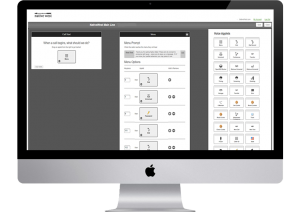
We implemented a fully managed IP Phone System for Native West. This provided them with complete control and flexibility to customize call flow, directing calls efficiently to field agents, specific departments, or voicemail as needed.
Management Platform
Bidding and Contract System
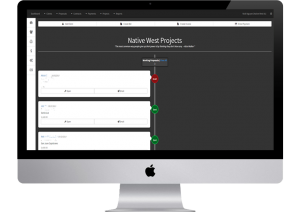
We developed a custom Management Platform that serves as the company’s operational backbone. This system is responsible for coordinating and connecting various departments – including Sales, Construction, Accounting, and Management – throughout the many complex stages of landscape construction projects, from initial bidding to final accounting.
Want more control over your company?
Schedule a free phone consultation to discuss how our solutions can help you streamline operations and gain greater control.
Is your account info compromised?

Demonstrating Data Security Risks: A Look at Compromised Credentials
We have curated a significant collection of over 1.5 billion hacked credentials (including usernames and associated passwords) sourced from various parts of the internet, including the “Deep Web/Dark Web” (often referred to as the internet underground). This substantial trove of data now totals over 40 Gigs – roughly equivalent to the storage capacity for approximately 13,000 songs on an MP3 player. As you can imagine, processing and managing data on this scale requires techniques far beyond typical web programming.
We hope you find the following functional demonstration both useful and informative. Even we were quite surprised to discover that a couple of our own accounts had been compromised based on this data.
To prevent any potential abuse, we can only show you a portion of the compromised password associated with any queried username/email.
Important Note: We strongly dislike SPAM. Any email addresses provided during this demonstration will not be redistributed or used for any other purpose.
8 Tips for picking a better domain name

Choosing the Right Domain Name: Tips for Memorability and SEO
These tips for selecting a domain name not only coincide with easier search engine indexing but also take into consideration fundamental human psychology and memory. Human memory is vital because if your potential visitors cannot easily recall or correctly type your web address, they are significantly less likely to reach their intended destination.
Here are key considerations for choosing a memorable and effective domain name:
- Choose a .com extension: While other extensions exist, .com is still the most recognized and trusted domain extension globally.
- Use your brand name: Your domain name should ideally be your brand name. This reinforces your identity and makes it easy for customers to find you.
- Don’t use exact match domains: Avoid domain names that are just exact keywords (e.g., “bestsellingshoesonline.com”). Partial match domains are acceptable in some cases, but a domain based on your brand name is always preferred for long-term strategy and branding.
- Make it memorable: A good domain name is easy to remember after seeing or hearing it just once or twice.
- Ensure it’s easy to spell: Avoid unusual spellings or words that are commonly misspelled. Simplicity is key.
- Avoid special characters: Hyphens and numbers can be confusing and make the domain harder to remember and share. Stick to letters.
- Avoid intentional misspellings: While some brands intentionally misspell for uniqueness, it can make the domain hard to recall and type correctly for most users.
- Under 14 Characters: Generally, shorter domain names are better as they are easier to remember and less prone to typing errors. Aim for under 14 characters if possible.