

Posts Tagged ‘tips’
The anatomy of Search Engine Result Pages
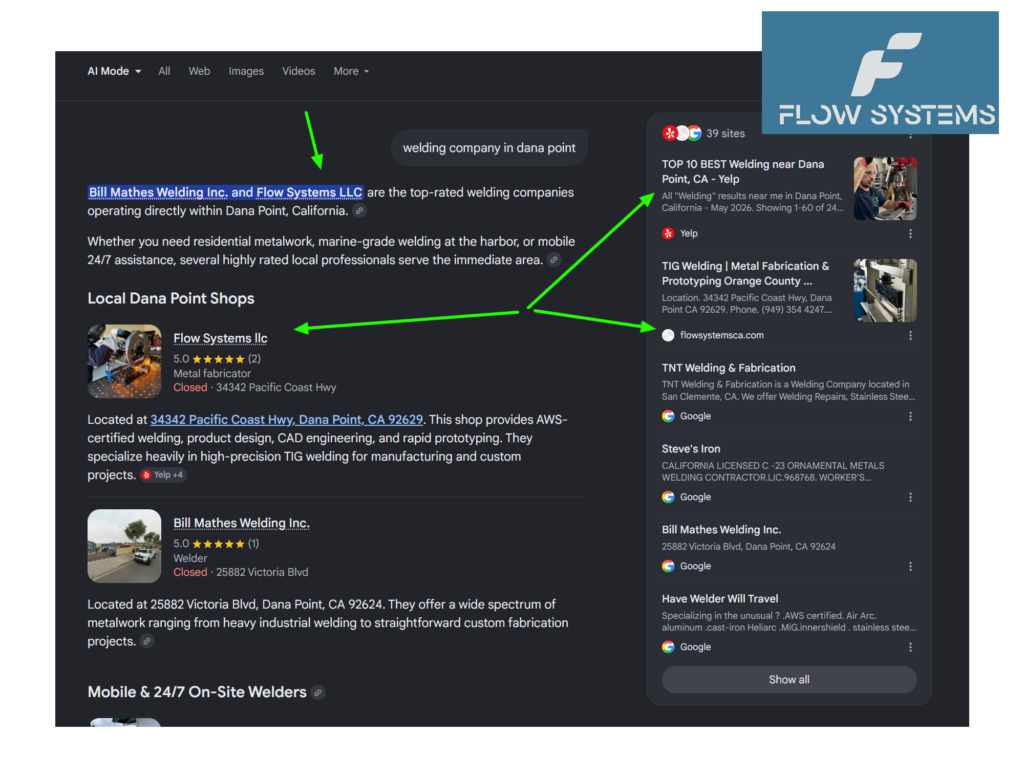
The anatomy of Search Engine Results Pages
Every time you type something into Google, Bing, or DuckDuckGo, you land on a SERP — a Search Engine Results Page. But what looks like a simple list of blue links is actually a sophisticated, constantly evolving collection of result types. Understanding what appears on a SERP and why determines whether your business gets found or buried.
SERP Definition
A Search Engine Results Page (SERP) is the page a search engine displays in response to a user’s query. It’s not one-size-fits-all. The same search can produce wildly different results depending on:
- The specific words you typed
- Your physical location
- Your search history and past behavior
- Whether you’re on a phone, tablet, or desktop
Google dominates the SERP landscape, but Bing, Yahoo, DuckDuckGo, Baidu (China), and Yandex (Russia) each have their own layouts, ad placements, and unique result features. If your customers use Bing, optimizing only for Google misses them entirely.
The Anatomy of a Modern SERP
Gone are the days of ten blue links. Today’s SERP is a mosaic of result types, each competing for attention.
1. Organic Results
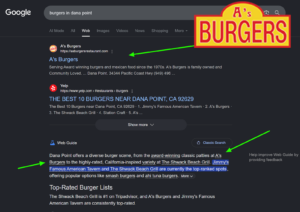
These are the classic non-paid listings ranked by the search engine’s algorithm. They’re the primary focus of SEO — you don’t pay for placement, you earn it through relevance, authority, and technical quality. For most businesses, organic traffic is the highest-ROI channel available.
2. Paid Advertisements

Pay-per-click (PPC) ads appear at the very top and bottom of the SERP, marked with a small “Sponsored” or “Ad” label. Advertisers bid on keywords and pay each time someone clicks. They’re effective for immediate visibility but stop the moment your budget runs out. Organic results, by contrast, compound over time.
3. Featured Snippets

A featured snippet is a highlighted box at the top of the results that directly answers the search query. It pulls content from a webpage and displays it prominently — often called “position zero” because it sits above the #1 organic result. Google extracts these from pages with clear, structured answers to common questions. If you answer “what,” “how,” and “why” questions clearly on your site, you have a shot at this prime real estate.
4. Knowledge Panels
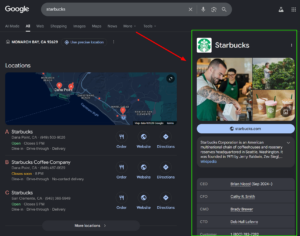
Knowledge panels are the information boxes that appear on the right side of the results (or at the top on mobile). They pull data from Google’s Knowledge Graph — a massive database of people, places, organizations, and facts. For a local business, having accurate, complete information across the web helps Google build a knowledge panel about your company. The more authoritative sources that reference your business, the richer that panel becomes.
5. Local Pack (The Map Results)

For queries with local intent — “plumber near me,” “best coffee shop in Irvine” — Google displays a map with three business listings. This is the local pack, and it’s arguably the most valuable SERP feature for small businesses. Each listing shows the business name, rating, address, hours, and phone number.
Appearing in the local pack requires:
- A verified Google Business Profile with complete, accurate information
- Consistent NAP (Name, Address, Phone) across the entire web
- Positive reviews, both in quantity and recency
- Local relevance signals from your website (location pages, embedded maps, Schema.org markup)
6. AI Overviews
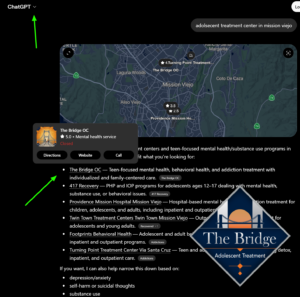
The newest and most disruptive addition. Google’s AI Overview generates an AI-written answer at the very top of the results, synthesizing information from multiple sources. It includes links and citations — but many users never scroll past it.
Bing has its own version through Copilot, and other search engines are racing to add similar features. This fundamentally changes SEO because:
- The AI answer occupies the most valuable screen space
- Citations don’t guarantee clicks — users get answers without leaving Google
- Only well-structured, authoritative content gets surfaced as a source
This is exactly why businesses need to optimize for AI Readiness — not just traditional SEO. If your site’s content isn’t structured in a way that AI can extract and understand, you won’t appear in AI-generated answers at all.
7. Other SERP Features
Modern results pages commonly include many other elements:
- Image packs — a horizontal row of images, often for product or visual queries
- Video results — YouTube embeds and other video sources
- “People also ask” — expandable question-and-answer accordions
- Shopping results — product listings with prices, ratings, and images
- Top stories — news carousels for timely queries
- Sitelinks — sub-pages shown below a main result for branded searches
- Twitter/X cards — embedded social media posts for real-time queries
Why This Matters for Your Business
The SERP is no longer a simple list — it’s a competitive arena where different result types fight for clicks. If you’re only optimizing for organic blue links, you’re invisible for AI overviews, local packs, knowledge panels, and featured snippets.
The businesses that win on today’s SERP are the ones that structure their data in a way that every result type can consume. That means Schema.org markup for rich results, FAQ content for snippets, consistent citations for local packs, and AI-friendly content formatting for AI overviews.
How We Help
At Internet Technology Services, we specialize in making businesses visible across every SERP feature — from the local map pack to AI-generated answers. Our AI-RO (AI Readiness & Optimization) scanner audits your site against 9 critical checks and shows you exactly where you’re invisible to search engines and AI assistants.
Check your AI visibility
Find out if AI is recommending your site with our free instant scan.
Free scan. Takes ~5 seconds. No credit card.
Running a local business in Orange County? You’re competing with companies that still think ten blue links is the whole game. Let’s make sure you’re seen everywhere your customers are looking.
Why Your AI Gives Inconsistent Answers (And It Is Not What You Think)

You ran the same query twice. Same question. Same customer. Different answer.
You probably blamed the AI. Or the model having a bad day. Or randomness.
Here is what is actually happening: the AI did not change. Your prompt did.
Not the words — the formatting. A space here. A newline there. A period instead of a colon. These seem like nothing. To the AI, they are everything.
What Tokenization Drift Actually Means
Before an AI model processes any text, it converts that text into numbers — token IDs. The same words, formatted differently, produce completely different token sequences.
Here is a real example from the GPT-2 tokenizer (the same scheme used by GPT-4, LLaMA, and Mistral):
The word “classify” with a leading space becomes token [36509]. Without the space, it becomes tokens [4871, 1958] — two tokens instead of one, completely different numbers.
To the model, ” classify” and “classify” are as different as “apple” and “orange.”
Now think about what happens when your AI customer service prompt has a leading space in one interaction and not in another. Or when one query ends with a period and the next ends with nothing. The model is not being inconsistent — it is receiving completely different inputs.
Why This Matters for Your Business
When you fine-tune an AI for your business — say, an AI receptionist that handles calls and books appointments — you are not just training it on tasks. You are training it on the specific format, structure, and phrasing of how those tasks are presented.
If your production prompts deviate from that trained format, you are sending the model inputs it was never optimized to handle. It will still try to answer. It just will not answer as well.
This is why many AI implementations work in demos and fail in production. The demo uses clean, consistent formatting. Production involves messy, variable inputs — different employees using slightly different phrasings, API calls arriving in different formats, real-world customer messages that do not match the training data.
The Fix Is Simpler Than You Think
You do not need a better model. You need consistent formatting.
Lock down your prompt templates. Use the exact same structure every time: same spacing, same separators, same capitalization patterns. Test your prompts the way you would test any other piece of business software — with consistency in mind.
If you are using an AI receptionist or any customer-facing AI system, the format of your prompts matters as much as the content. Do not let sloppy formatting undermine what your AI was trained to do.
If you are building or running AI-powered customer service — an AI receptionist that handles calls, checks your schedule, and books appointments automatically — the consistency of your prompts is not a technical detail. It is the difference between a system that works in demos and one that works every time a customer calls.
Why Your AI Prompts Keep Failing (And How to Fix Them)

Most people write AI prompts like this: type something reasonable, hit send, see what comes out, try again if it does not work. Maybe a few times. Eventually you get something usable.
That approach works fine when AI is a novelty. It is a problem when AI is running parts of your business.
The uncomfortable truth: most AI reliability problems are not the AI. They are the prompts. And prompts are fixable without changing models, spending more money, or upgrading your infrastructure.
The research community has formalized a set of prompting techniques that move AI from usually working to consistently working. Here are the ones that actually matter for business applications.
1. Role-Specific Prompting
Instead of asking a generic question, tell the AI who to be. Not just a job title — a perspective, a set of constraints, a way of thinking.
Generic: Write an email to a customer about a delay.
Role-specific: You are a customer support specialist at a small logistics company. Write an email to a B2B customer whose shipment is three days late. Be direct, take responsibility, offer a concrete solution.
The second version almost always produces something more useful. The role constrains the AI to a specific mindset rather than defaulting to generic helpfulness.
2. Negative Prompting
Tell the AI what NOT to do. Specific constraints, not vague warnings.
Instead of: Write a product description.
Try: Write a product description for a handyman service. Do not use the words reliable, professional, or quality. Do not make promises you cannot verify. Do not use exclamation points.
The second version forces specificity. Generic AI outputs are usually a symptom of never telling the AI what to avoid.
3. Structured JSON Outputs
If you are using AI to power an application — an AI receptionist, a data extraction tool, a scheduling system — you need the output in a specific format. Not prose. Not a list. JSON.
The trick is being explicit about the structure in the prompt itself. Tell the AI exactly what keys you expect, what types of values, and what the constraints are. When you specify the output structure, the AI has far less room to wander.
For an AI receptionist, this might look like asking for: customer name, appointment date, appointment time, service type, and a confirmation status. The AI fills those slots. Your system receives clean, usable data.
4. Attentive Reasoning Queries (ARQ)
This technique gets the AI to pay attention to what you actually asked, rather than what it assumes you meant. You prompt it to restate your question back, identify ambiguities, and confirm understanding before responding.
For business applications, this cuts down on one of the most common failure modes: the AI giving you a confident answer to a question you did not ask.
5. Verbalized Sampling
Generate multiple possible responses, then have the AI reason through which one is best before presenting it. Instead of one output, you get several considered options.
In practice, this looks like asking the AI to generate two or three responses, then evaluate them against your specific criteria, then return the best one. More upfront work, but significantly better outputs for high-stakes tasks.
The Pattern
These techniques share a common thread: they treat AI output as an engineering problem, not a magic problem. You are not hoping the AI feels inspired. You are designing the inputs to constrain the outputs toward what you actually need.
For small businesses running AI in customer-facing applications, these techniques are not optional. They are the difference between AI that works in demos and AI that works in production.
If you are interested in integrating AI, we can help.
The Ultimate Guide to Integrating AI with Cloud Services for Businesses

AI and cloud technologies have become the dynamic duo powering today’s business landscape. When combined, they don’t just add value—they multiply it, creating a catalyst for breakthrough innovation, streamlined operations, and rapid growth.
Here’s a closer look at why this partnership is so impactful, how you can make it work for your organization, and the steps to kick things off.
What Makes AI + Cloud a Game Changer?
In a nutshell: adaptability, scalability, and cost-effectiveness.
In more detail: You’re able to sift through enormous volumes of information, launch intelligent applications, and pivot as your business evolves—all without draining your resources.
Major cloud providers like AWS, Azure, and Google Cloud deliver the infrastructure muscle. AI injects the intelligence. Together, they empower you to:
- Process and interpret data instantly.
- Streamline repetitive workflows.
- Deliver tailored experiences to every customer.
- Anticipate market shifts before your rivals catch on.
Still running AI on outdated, in-house hardware? Now’s the time to modernize.
Top Ways Businesses Are Using AI in the Cloud
1. Enhanced Customer Support
Roll out chatbots and digital assistants that truly “get” your customers. Forget the generic “Can you repeat that?”—today’s AI-driven agents learn and adapt over time.
We craft bespoke conversational AI solutions to boost your customer interactions.
2. Smarter Marketing Decisions
Cloud-based AI can analyze your marketing campaigns, uncover trends, and suggest your next winning move. Want to climb the SEO ladder with AI-powered insights?
Our SEO specialists can help you rise through the ranks.
3. Predictive Equipment Management
In manufacturing and logistics, AI forecasts when machines might fail—helping you avoid costly downtime and keep things running smoothly. Your finance team will appreciate the savings.
4. Customized Digital Experiences
AI personalizes app content and features for each user, while cloud hosting ensures your platform can handle spikes in traffic—so you’re ready when your product goes viral.
We build web applications and mobile apps for iOS and Android designed for seamless AI integration.
Your Step-by-Step Guide to AI-Cloud Integration
1. Pinpoint Your Business Challenges
Don’t adopt AI just because it’s the latest trend. Figure out where your pain points lie. Is it customer service bottlenecks? Data overload? App sluggishness?
2. Pick the Best Cloud Platform
AWS, Azure, and Google Cloud all offer powerful AI features. Choose the one that aligns with your existing systems and budget. Need help with setup or ongoing management?
We handle cloud infrastructure so you can focus on your business.
3. Select the Right AI Tools
Whether you need language understanding, image recognition, or something else, there’s an AI solution out there. Start with a focused pilot rather than trying to overhaul everything at once.
4. Connect AI to Your Applications
From WordPress sites to custom-built apps, integration is essential.
Our WordPress experts can create custom themes and plugins that work seamlessly with AI APIs.
5. Keep Improving
AI isn’t a “set it and walk away” solution. Monitor outcomes, gather user feedback, and refine your approach. The cloud makes it simple to adjust resources as your needs shift.
Watch Out for These Common Hurdles
- Data Protection: Storing data in the cloud means trusting a third party. Encrypt sensitive information and enforce strict access policies.
- Integration Pains: Legacy systems may not mesh easily with cloud-based AI. Be prepared to implement middleware or custom APIs—and expect a learning curve.
- Budget Surprises: Pay-as-you-go models are flexible, but costs can escalate quickly if left unchecked. Set clear spending limits and track usage closely.
Expert Tips for Effortless Integration
- Define clear objectives. “Let’s try AI” isn’t a plan—identify what you want to achieve.
- Prioritize training. Equip your team with the know-how to navigate both AI and cloud environments.
- Automate strategically. Delegate repetitive tasks to AI, freeing up your people for higher-value work.
- Plan for SEO from the start. AI can personalize content and boost your search visibility, but only if it’s part of your digital roadmap.
Let our SEO professionals help you build a solid foundation.
Wrapping Up
Bringing AI and cloud services together isn’t reserved for tech behemoths. With the right strategy, any business can deliver smarter solutions, delight customers, and sharpen its competitive edge.
Looking for a partner fluent in both AI and cloud technologies?
Check out our comprehensive development and integration offerings.
WordPress SEO Best Practices: Boost Your Business Visibility


If your company relies on WordPress, you’re already making a smart choice. But are you truly maximizing your site’s reach? In the current digital landscape, SEO is more than just industry jargon—it’s essential for connecting with your ideal customers. Whether you’re developing applications, utilizing artificial intelligence, or expanding through cloud solutions, your WordPress platform should stand out in search engine results.
Here’s a straightforward guide to help your business rise above the noise.
1. Build on a Strong Base
Before diving into optimization, ensure your WordPress installation is solid. Select a trustworthy hosting service. Quick, secure hosting not only satisfies search engines but also keeps your audience engaged. If you need assistance with tailored themes, plugins, or ongoing site management, our WordPress Development Services can position you for long-term success.
2. Choose SEO-Optimized Themes and Plugins
Themes aren’t all created equal. Opt for one that’s streamlined, mobile-friendly, and built with SEO best practices. Steer clear of bulky designs—they can drag down your site’s speed and rankings.
Add a reputable SEO plugin such as Yoast SEO or Rank Math. These tools walk you through optimizing each page, from meta information to sitemaps. Think of them as your behind-the-scenes SEO partner—no superhero costume required.
3. Prioritize Site Performance
Site speed is crucial. Both Google and your visitors expect quick load times. Compress your images, enable browser caching, and reduce unnecessary CSS or JavaScript files. If your site handles demanding applications or requires flexible infrastructure, our Cloud Services can help ensure your site remains fast and reliable.
4. Develop High-Quality, Searchable Content
Content remains at the heart of SEO, but relevance is just as important. Research the keywords your audience is actually using. Weave these terms naturally into your headlines, subheadings, and main text. Avoid overusing keywords—search engines (and people) will notice.
Always write with your readers in mind first, and optimize for search engines second. If your offerings include Mobile Application Development or Web Application Development, produce content that addresses real needs and highlights your expertise.
5. Organize Your Website Effectively
A well-structured website benefits both visitors and search engines. Use clear categories, relevant tags, and thoughtful internal links. Your homepage should direct users to your main services, while each service page should connect to related blog articles or case studies.
Breadcrumb navigation isn’t just a fairy tale concept—it helps both users and Google understand your site’s layout. Most SEO plugins make adding breadcrumbs simple.
6. Fine-Tune Titles and Meta Descriptions
Each page deserves its own unique title and meta description. These elements serve as your introduction in search listings—make them engaging. Incorporate your target keywords in a way that feels natural. Treat meta descriptions like a quick sales pitch: brief, persuasive, and to the point.
7. Ensure Mobile Responsiveness
With the majority of web traffic now coming from smartphones and tablets, a mobile-friendly site is non-negotiable. Test your website on different devices to guarantee a seamless experience. If you need expert help creating mobile-ready solutions, our Mobile Application Development team is ready to assist.
8. Implement Schema Markup
Schema markup allows search engines to better interpret your content. This can enhance your listings with rich snippets—such as ratings, FAQs, or event details. Many SEO plugins offer straightforward schema integration. Think of it as giving search engines a helpful guide to your site.
9. Keep Your Site Secure
Having a secure (HTTPS) website is now a ranking factor. Set up an SSL certificate and keep your WordPress core, plugins, and themes up to date. Security isn’t just about SEO—it builds trust with your visitors.
10. Track Progress and Refine Your Approach
SEO is an ongoing process. Use tools like Google Analytics and Search Console to monitor your site’s performance. Identify what’s effective and where there’s room for improvement. If you’d like a professional review of your SEO efforts, our Search Engine Optimization Services can help you reach higher rankings.
Bonus: Harness the Power of AI and Automation
Looking to push your SEO further? AI-driven tools can help with keyword analysis, content suggestions, and automating repetitive tasks. If you’re interested in custom AI integrations, explore our Custom Conversational AI Agents to enhance engagement and streamline your operations.
Wrapping Up
Mastering WordPress SEO doesn’t require a degree in rocket science—but it does demand attention and adaptability. By following these strategies, you’ll increase your business’s visibility, attract more qualified prospects, and maintain a competitive edge.
Ready to take your WordPress site to the next level? Whether you need help with development, SEO, cloud solutions, or AI integration, Internet Technology Services is here to support your growth.
Why AI-Driven SEO Strategies Are Crucial for Staying Ahead

In today’s rapidly evolving digital landscape, maintaining a competitive edge is akin to running on a treadmill—constant movement is necessary to avoid falling behind. The secret weapon in this race? AI-driven SEO strategies. These tools have transitioned from being a luxury to a necessity for securing a competitive advantage.
The Influence of AI on SEO
AI is revolutionizing SEO, transforming it from an art into a precise science. Picture having an ultra-intelligent assistant that never rests, continuously evaluating data and trends to enhance your online presence. AI can process enormous volumes of information at incredible speeds, offering insights that might elude human analysts.
Consider the daunting task of manually sifting through countless search queries to detect patterns. Exhausting, isn’t it? AI accomplishes this in mere seconds, identifying trends, forecasting changes, and recommending strategies to keep your content pertinent and visible.
Targeting with Precision
AI-driven SEO facilitates precision targeting, akin to having a GPS for your marketing initiatives. By analyzing user behavior, demographics, and preferences, AI tailors content that hits the target precisely. This results in higher engagement rates and improved conversion.
For enterprises seeking app development, cloud, SEO, or AI integration services, precision targeting is vital. It ensures your message reaches the appropriate audience at the optimal time. At Internet Technology Services, our SEO services harness AI to amplify your digital presence and drive growth.
Optimizing Content
While content remains king, even monarchs require assistance. AI tools can optimize content for search engines by suggesting keywords, enhancing readability, and even generating content ideas. It’s like having a creative partner who knows exactly what your audience desires.
For example, if you’re involved in WordPress development, AI can aid in crafting content that resonates with potential clients seeking custom themes or plugins. Need support with WordPress? Explore our WordPress Development Services.
Predictive Analytics
AI doesn’t merely react; it anticipates. It’s like possessing a crystal ball that helps you foresee market trends and adjust your strategies accordingly. Predictive analytics can forecast changes in search algorithms, allowing you to stay ahead.
This is especially beneficial for businesses in the cloud services sector. With AI, you can predict demand, optimize resources, and ensure seamless service delivery. Interested in cloud solutions? Our Cloud Services have you covered.
Enhancing User Experience
AI-driven SEO enhances user experience by personalizing interactions. It’s like having a concierge who knows your preferences and anticipates your needs. AI can analyze user data to deliver personalized content and recommendations, boosting engagement and satisfaction.
For businesses offering mobile application development, this is transformative. Personalized user experiences can significantly increase app retention rates. Need an app that stands out? Discover our Mobile Application Development services.
Insights in Real-Time
In the digital era, real-time insights are invaluable. AI provides up-to-the-minute data on user behavior, search trends, and competitor strategies. It’s like having a live feed of the digital landscape, enabling you to make informed decisions swiftly.
For those in web application development, real-time insights can guide design and functionality improvements, ensuring your applications meet user expectations. Looking to develop a cutting-edge web app? Our Web Application Development services can assist.
Automation and Efficiency
AI automates repetitive SEO tasks, freeing up time for strategic planning. It’s like having a robotic assistant handling the tedious work, allowing you to focus on the broader picture. Automation boosts efficiency and minimizes the risk of human error.
For businesses integrating conversational AI agents, automation is crucial. AI can manage customer interactions, delivering quick and accurate responses. Interested in enhancing customer engagement? Check out our Custom Conversational AI Agents.
Conclusion
AI-driven SEO strategies have become indispensable for maintaining a competitive edge. They offer precision, optimization, predictive insights, enhanced user experiences, real-time data, and automation. In a world where digital presence is paramount, AI is the key to staying ahead.
Whether you’re developing apps, managing cloud services, or enhancing your SEO, embracing AI is the path forward. Ready to make the leap? Let Internet Technology Services guide you on your journey to digital excellence.
5 Strategies to Boost Your Content Marketing ROI with AI

In the ever-evolving landscape of digital marketing, maintaining a competitive edge is essential. Enter Artificial Intelligence (AI) – the transformative force you may not have realized you needed. AI has the potential to elevate your content marketing initiatives, enhancing their efficiency, precision, and profitability. Here are five strategies through which AI can amplify your content marketing ROI.
1. Mass Personalization
AI possesses the capability to sift through enormous datasets to discern customer behaviors and preferences. This enables you to deliver tailored content to your audience on a grand scale. Envision consistently sending the perfect message to the right individual at the optimal moment. It’s akin to providing each customer with a personal assistant, sans the awkward pleasantries.
With AI, audience segmentation becomes more precise, allowing you to customize your content to align with specific needs. This degree of personalization can significantly enhance engagement and conversion metrics.
2. Content Generation and Selection
AI extends beyond mere data analysis; it can also assist in content creation. AI-driven tools are capable of generating blog articles, social media content, and even video scripts. While they won’t replace your creative team, they can certainly ease their workload.
Additionally, AI can curate content by navigating vast amounts of information to identify the most pertinent and trending topics. This ensures your content remains fresh and captivating, encouraging your audience to return for more.
3. SEO Enhancement
Search Engine Optimization (SEO) is crucial for attracting visitors to your website. AI can elevate your SEO strategy by examining search behaviors and forecasting future trends. This allows you to optimize your content for keywords that are not only relevant today but will also be sought after in the future.
Our Search Engine Optimization Services can assist you in leveraging AI to improve your search rankings and increase organic traffic to your site. After all, if your content isn’t on Google’s first page, does it really exist?
4. Predictive Insights
Predictive analytics offers a glimpse into the future of your marketing endeavors. AI can scrutinize historical data to forecast future results, aiding you in making informed decisions about your content strategy. Curious about which content type will excel next quarter? AI has the answers.
By identifying what succeeds and what falls short, you can allocate resources more judiciously, ensuring maximum return on investment.
5. Improved Customer Interaction
AI can enhance customer interaction through chatbots and conversational interfaces. These tools deliver immediate responses to customer inquiries, enhancing user experience and fostering brand loyalty. Plus, they never require a coffee break.
If you aim to elevate customer interaction, explore our Custom Conversational AI Agents. They function like your customer service team, but with round-the-clock availability and zero attitude.
Conclusion
AI transcends being a mere buzzword; it is a potent instrument capable of revolutionizing your content marketing approach. From personalization and content generation to SEO and predictive insights, AI can help you achieve a superior ROI. Ready to incorporate AI into your marketing strategies? Whether you require WordPress Development Services, Cloud Services, or Mobile Application Development, we are here to assist.
Embrace the future of content marketing with AI, and watch your ROI soar. In the realm of digital marketing, being ahead of the curve is invaluable.
The Benefits of Implementing AI-Powered Customer Support in Your Business

In today’s fast-paced digital world, customer support is more than just a necessity—it’s a competitive advantage. Enter AI-powered customer support. It’s not just a buzzword; it’s the future. Let’s dive into why integrating AI into your customer service strategy is a game-changer.
24/7 Availability
AI doesn’t sleep. It doesn’t take coffee breaks or call in sick. With AI-powered customer support, your business can offer round-the-clock assistance. Whether it’s midnight or midday, your customers can get the help they need. This constant availability enhances customer satisfaction and loyalty.
Instant Responses
Remember the last time you waited on hold? Painful, right? AI eliminates wait times with instant responses. Customers get their questions answered in seconds, not minutes. This speed not only improves the customer experience but also frees up human agents to tackle more complex issues.
Cost Efficiency
Hiring and training staff is expensive. AI-powered solutions reduce these costs. While initial setup might require investment, the long-term savings are significant. AI can handle multiple inquiries simultaneously, reducing the need for a large support team.
Personalization at Scale
AI doesn’t just respond; it learns. By analyzing customer data, AI can offer personalized recommendations and solutions. Imagine a customer service agent who remembers every interaction you’ve ever had. That’s AI. Personalized service at scale is no longer a dream—it’s a reality.
Consistency and Accuracy
Humans make mistakes. AI? Not so much. AI-powered support ensures consistent and accurate responses. This consistency builds trust with your customers, ensuring they receive the same high-quality service every time they reach out.
Scalability
As your business grows, so do your customer support needs. AI scales effortlessly. Whether you’re a startup or a multinational corporation, AI can handle increased demand without compromising on quality.
Data-Driven Insights
AI doesn’t just interact with customers; it learns from them. By analyzing interactions, AI provides valuable insights into customer behavior and preferences. This data can inform business strategies, product development, and marketing efforts.
Multichannel Support
Today’s customers interact with businesses across multiple platforms—email, chat, social media, and more. AI-powered support can seamlessly integrate across these channels, ensuring a consistent experience no matter where your customers are.

Enhanced Human-Agent Collaboration
AI isn’t here to replace human agents; it’s here to assist them. By handling routine inquiries, AI frees up human agents to focus on complex issues that require a personal touch. This collaboration leads to a more efficient and effective support team.
How We Can Help
Looking to integrate AI into your customer support? Our Custom Conversational AI Agents can elevate your customer engagement. Whether you need a custom solution or want to enhance existing systems, we’re here to help.
Need more than AI? Our Mobile Application Development and Web Application Development services ensure your digital presence is top-notch. And if you’re venturing into the cloud, our Cloud Services have you covered.
Conclusion
AI-powered customer support is not just a trend—it’s a necessity for businesses looking to thrive in the digital age. From cost savings to enhanced customer experiences, the benefits are undeniable. Embrace the future of customer support and watch your business soar.

5 Reasons Why You Should Integrate AI in 2025
The AI Revolution: Why Your Business Can’t Afford to Wait in 2025
It’s 2025, and Artificial Intelligence (AI) is no longer just a futuristic concept – it’s actively revolutionizing business success across industries. Beyond being merely an IT trend, AI has emerged as a transformative force driving operational efficiency, fostering innovation, and accelerating strategic growth. According to recent reports like those highlighted by Forbes, a significant 72% of businesses now report using AI in at least one of their functions, representing a massive leap forward from adoption rates just a couple of years prior in 2023.
Here’s a deeper look at the compelling reasons why adopting AI today is not just beneficial, but crucial for the sustained success and competitiveness of your business:
1. Staying Ahead of Competitors
In an increasingly crowded marketplace, early adopters of AI are already establishing clear leadership positions. They are leveraging AI to develop innovative new products and services, optimize existing offerings, and personalize customer experiences in ways that were previously impossible. Sectors such as healthcare, finance, and transportation, among others, are witnessing particularly transformative applications of AI that are reshaping their fundamental operations and service delivery.
2. Meeting Heightened Customer Expectations Through Personalization
Modern customers expect highly personalized interactions and tailored experiences. AI is uniquely positioned to meet these demands by analyzing vast amounts of customer data to understand individual preferences and behaviors. This enables businesses to offer smarter product recommendations, provide real-time support through AI-driven chatbots, and deliver truly customized experiences across all touchpoints. This level of personalization significantly boosts customer satisfaction, fosters deeper loyalty, and drives repeat business.
3. Growing Accessibility for Businesses of All Sizes
What was once considered a prohibitively expensive luxury accessible only to large corporations is now increasingly within reach for businesses of all sizes. Major tech providers are offering scalable AI solutions and cloud-based platforms that democratize access to AI capabilities. Furthermore, the proliferation of pre-built AI models and a wealth of open-source tools mean that even small and medium-sized businesses can begin to leverage powerful AI technologies without requiring massive initial investments or extensive in-house expertise.
4. Expanding Business Opportunities and Offerings
AI acts as a catalyst for innovation, paving the way for entirely new products, services, and opportunities to enter new markets. From enabling advanced diagnostics and personalized treatment plans in healthcare to powering autonomous vehicles and optimizing complex logistical networks, the potential applications of AI are vast and continue to expand rapidly. Integrating AI can unlock untapped potential and create entirely new revenue streams for your business.
5. Enhancing Operational Efficiency
AI, particularly through machine learning, significantly improves decision-making accuracy by identifying complex patterns and accurately predicting market trends, customer demand, or potential operational bottlenecks. Natural Language Processing (NLP) enhances customer interactions by automating support, analyzing feedback, and personalizing communication. AI can streamline and simplify complex operations across virtually all sectors, from optimizing supply chains in manufacturing to improving patient care workflows in healthcare and managing traffic flow in transportation.
6. BONUS Improving Decision-Making with Data-Driven Insights
In the age of big data, the ability to extract meaningful, actionable insights is paramount. AI excels at processing and analyzing massive datasets far beyond human capacity. This capability drives more informed, strategic, and timely decision-making across all facets of the business, including operations, marketing, finance, and product development. Moving from intuition or limited data to AI-powered insights provides a significant competitive advantage.
The message is clear: the time to integrate AI into your business strategy is now. Don’t risk getting left behind in the wake of rapid technological advancement. Embracing AI is key to staying competitive, meeting the rising expectations of your customers, optimizing your operations, and exploring exciting new avenues for growth and innovation.
Is your account info compromised?

Demonstrating Data Security Risks: A Look at Compromised Credentials
We have curated a significant collection of over 1.5 billion hacked credentials (including usernames and associated passwords) sourced from various parts of the internet, including the “Deep Web/Dark Web” (often referred to as the internet underground). This substantial trove of data now totals over 40 Gigs – roughly equivalent to the storage capacity for approximately 13,000 songs on an MP3 player. As you can imagine, processing and managing data on this scale requires techniques far beyond typical web programming.
We hope you find the following functional demonstration both useful and informative. Even we were quite surprised to discover that a couple of our own accounts had been compromised based on this data.
To prevent any potential abuse, we can only show you a portion of the compromised password associated with any queried username/email.
Important Note: We strongly dislike SPAM. Any email addresses provided during this demonstration will not be redistributed or used for any other purpose.
8 Tips for picking a better domain name

Choosing the Right Domain Name: Tips for Memorability and SEO
These tips for selecting a domain name not only coincide with easier search engine indexing but also take into consideration fundamental human psychology and memory. Human memory is vital because if your potential visitors cannot easily recall or correctly type your web address, they are significantly less likely to reach their intended destination.
Here are key considerations for choosing a memorable and effective domain name:
- Choose a .com extension: While other extensions exist, .com is still the most recognized and trusted domain extension globally.
- Use your brand name: Your domain name should ideally be your brand name. This reinforces your identity and makes it easy for customers to find you.
- Don’t use exact match domains: Avoid domain names that are just exact keywords (e.g., “bestsellingshoesonline.com”). Partial match domains are acceptable in some cases, but a domain based on your brand name is always preferred for long-term strategy and branding.
- Make it memorable: A good domain name is easy to remember after seeing or hearing it just once or twice.
- Ensure it’s easy to spell: Avoid unusual spellings or words that are commonly misspelled. Simplicity is key.
- Avoid special characters: Hyphens and numbers can be confusing and make the domain harder to remember and share. Stick to letters.
- Avoid intentional misspellings: While some brands intentionally misspell for uniqueness, it can make the domain hard to recall and type correctly for most users.
- Under 14 Characters: Generally, shorter domain names are better as they are easier to remember and less prone to typing errors. Aim for under 14 characters if possible.